
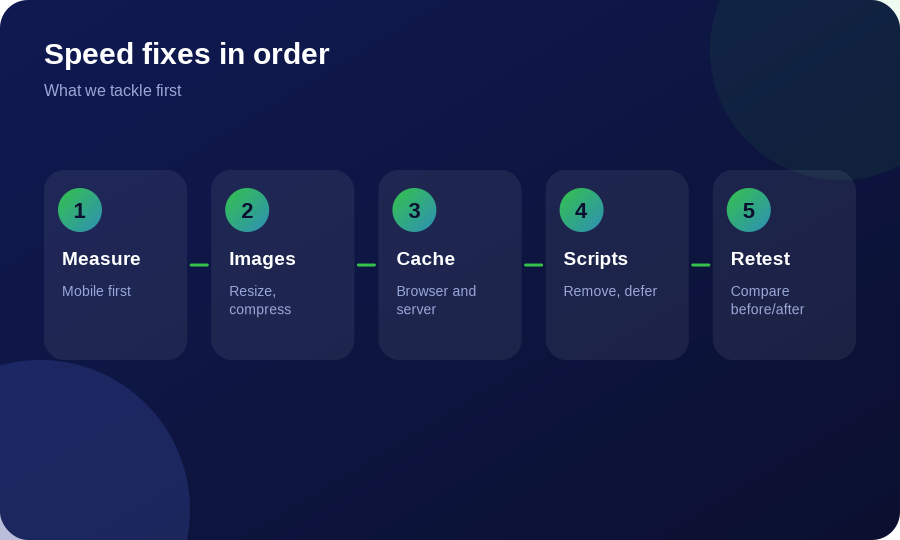
If you want the short answer: compress and resize your images, move to decent hosting, turn on caching, and remove the scripts you don't need. Those four things fix most slow sites we see. Everything else is fine-tuning.
The rest of this article walks through ten fixes in roughly the order we'd tackle them on a client project. Some take ten minutes. A couple need a developer. None need a huge budget.
One thing before we start. Test on a real phone, on mobile data, not on your office Wi-Fi. A lot of your customers in Nagpur or Indore are on a mid-range Android with a patchy 4G connection, and that is the experience you are actually selling to.
Measure first, so you know what you are fixing
Open Google PageSpeed Insights and paste your homepage URL. Run it for mobile, not desktop. You will get a score, but don't obsess over the number. Read the list of opportunities underneath it, because that list tells you what is actually heavy.
Run it on three pages: the homepage, one product or service page, and one blog post. Sites are often fast on the homepage because someone polished it, and slow everywhere else.
Write the numbers down. You will want a before and after, if only to show whoever is paying that the work did something.
1. Resize and compress your images
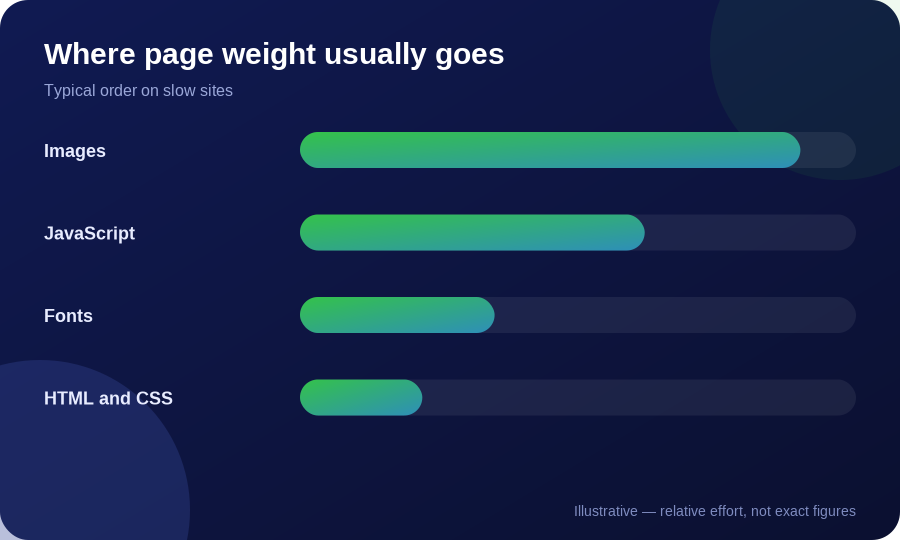
This is the big one. We have opened sites where a single banner was 4 MB because someone uploaded the original photo from a DSLR straight into the CMS. The banner displays at 1200 pixels wide. The file was 6000.
Resize images to the largest size they will actually be shown at. Then compress them. Tools like Squoosh or TinyPNG are free and take a minute per image. For WordPress, a plugin can do it in bulk, but check the output because some are aggressive.
Use JPEG or WebP for photos, PNG only when you need transparency, and SVG for logos and icons. A product photo of a kurta does not need to be 2 MB. Around 80 to 150 KB is usually plenty for a web display image.
2. Lazy-load what is below the fold
There is no reason to download the footer images before the visitor has even seen your headline. Add loading="lazy" to images that sit lower on the page. Modern browsers support it natively, so it is one attribute, not a library.
Don't lazy-load the main banner image at the top. That one should load first. We see this mistake often, usually from plugins that lazy-load everything blindly, and it makes the page feel slower, not faster.
3. Check your hosting honestly
Cheap shared hosting at a few hundred rupees a year is fine for a brochure site with ten visitors a day. It is not fine when your server takes two seconds just to start responding.
In PageSpeed or WebPageTest, look for the time to first byte. If it is consistently slow even on a tiny page, the problem is the server, and no amount of image work will hide it. For most Indian SMEs, a decent managed VPS or a good shared plan from a provider with servers in India or Singapore costs somewhere in the range of 3,000 to 12,000 rupees a year. Prices move around, so treat that as a rough planning range.
Server location matters more than people think. If your customers are in India and your server is in the US, every request pays a round trip across the planet.
4. Turn on caching
Without caching, your server rebuilds the same page from scratch for every visitor: querying the database, running PHP, stitching the HTML together. With caching, it saves the finished page and hands it out.
On WordPress, one good caching plugin, set up properly, is enough. Don't install three. They fight each other. On a custom PHP site, a developer can add page caching or at least set proper browser cache headers so returning visitors don't re-download your CSS and logo every time.
5. Use a CDN if your audience is spread out
A CDN stores copies of your static files (images, CSS, JavaScript) on servers in many cities. Cloudflare's free plan is a sensible starting point and takes about half an hour to set up with a developer's help.
Be honest about whether you need it. A Kolhapur jeweller selling only to local customers gets little from a CDN. A Mumbai exporter with buyers in Dubai and London gets quite a lot.
6. Fix your fonts
Custom fonts are a quiet source of slowness. We have seen sites loading five weights of two different Google Fonts, plus an icon font, just to show a heading and some body text.
Pick one font family, two weights at most. If you serve Hindi or Marathi content, load the Devanagari subset only for the pages that need it. Host the font files yourself if you can, and use font-display: swap so text shows up immediately in a fallback font instead of staying invisible.
7. Cut the scripts you don't need
Open your site, view source, and count the script tags. Chat widgets, three analytics tools, a heatmap tool someone tried in 2022, a Facebook pixel nobody checks, a slider plugin for a slider that was removed. Each one is a request, and some of them are heavy.
Make a list. For each script ask: who looks at this data, and when did they last look? If nobody can answer, remove it. A WhatsApp chat button, for example, can be a plain link to a wa.me URL. It doesn't need a 300 KB widget.
8. Minify and combine CSS and JavaScript
Minifying strips whitespace and comments from code files so they download faster. Most caching plugins and build tools do this with a tick box. On custom sites, it is part of the build step.
A caution from experience: after enabling minify or combine, click through the whole site, including the checkout and the contact form. We've seen Razorpay buttons quietly stop working because an aggressive combine setting broke the order that scripts loaded in. Test the paths that make you money.
9. Reduce what the page asks for
Fewer requests, smaller pages. Look at your homepage and ask whether it really needs eight sections, a video background, a testimonial carousel and an Instagram feed embed.
Embedded videos are a classic. A YouTube embed loads a lot of code even if nobody presses play. Replace it with a thumbnail image that loads the player only on click. Same goes for Google Maps embeds on the contact page.
10. Keep your database and plugins tidy
On WordPress especially, sites get slower with age. Old post revisions, spam comments, expired transients, plugins you installed to try once. Clean the database every few months, and delete (not just deactivate) the plugins you don't use.
Also keep things updated. Outdated plugins are slow and also a security risk, which is a bad combination.
What to expect, and what not to
If a site is badly bloated, doing items 1 to 4 can change the load time dramatically, sometimes from over ten seconds on mobile to under three. That is a typical pattern in our experience, but results depend on your starting point, your host and your theme.
Don't chase a perfect 100 score. A 75 on mobile that feels quick and converts is better than a 98 on a stripped-down page nobody wants to buy from. Speed is a means. The goal is that the visitor reaches your enquiry form or your cart without giving up.
Closing thoughts
Most speed problems are boring ones: big images, weak hosting, too many scripts. Work through the list above one item at a time, re-test after each change, and you will usually find the culprit within an afternoon.
If you would rather have someone else audit the site and fix what is found, that is something we do at Ariess. You can reach us through ariess.in/contact.php and tell us what is slowing you down. Even if you decide to do it yourself, the checklist above should get you most of the way.

Reviewed by Nitin Madhukar More, founder. Ariess builds websites, software, apps and digital marketing for growing businesses in India.