
Quick answer: if your app is mostly forms, catalogues, bookings, dashboards or content, a progressive web app (PWA) will usually get you to market faster and cheaper, and it works on both Android and iPhone from one codebase. If you need deep phone features, heavy graphics, reliable background work or a strong presence in the Play Store and App Store, build native. Many Indian businesses are better served by starting as a PWA and going native later, once real users have told them what they want.
That is the short version. The rest of this article explains the trade-offs so you can judge your own case, because "it depends" is only useful if you know what it depends on.
What a PWA actually is
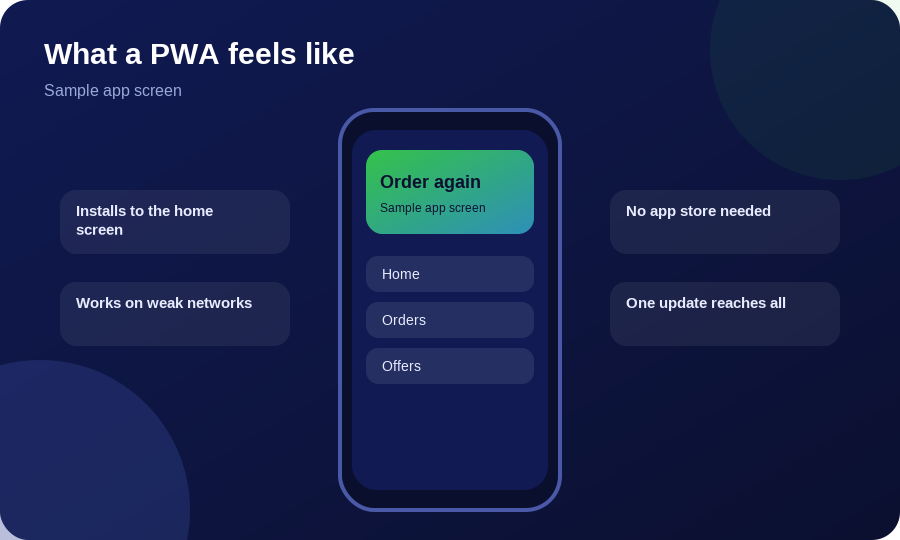
A PWA is a website that behaves like an app. Users open it in a browser, and can "install" it to their home screen, where it gets its own icon and opens full screen. It can work offline, load quickly from cached files and send push notifications on most Android browsers.
There is no download from the Play Store required, which matters more in India than people admit. Lots of users have phones with 32 or 64 GB of storage that is already full of WhatsApp videos. Asking someone to install a 60 MB app to book a haircut is a big ask. Sending a link they tap once is much easier.
A native app is built specifically for Android (Kotlin or Java) or iOS (Swift), or with cross-platform frameworks like Flutter and React Native that produce real installable apps. It lives in the app stores and has full access to the phone's hardware.
Cost and timelines
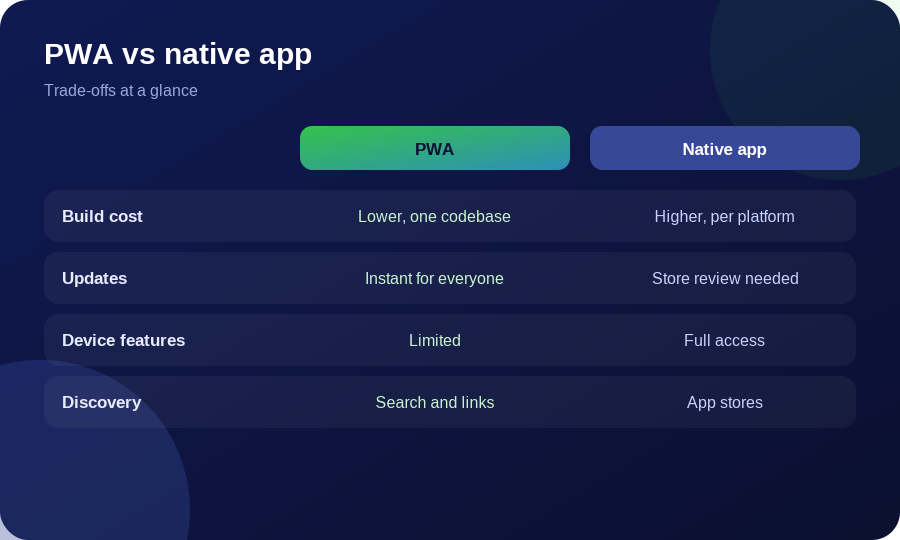
In our experience, and as rough planning ranges only, a straightforward PWA for a small business typically costs ₹1,00,000 to ₹4,00,000 and takes four to ten weeks. A native app for both Android and iOS with similar features often runs ₹3,00,000 to ₹12,00,000 and takes two to five months. A single platform costs less, but you then lose half your potential users or end up paying twice.
Maintenance differs too. A PWA updates the moment you deploy; nobody has to download a new version. Native apps go through store review, and users may run old versions for months. Apple also charges ₹8,000-odd a year for a developer account, and Google has a one-time fee. They are small amounts, but they exist.
Prices move a lot with features. A booking app with UPI payments and an admin panel is a different animal from a simple catalogue.
Where PWAs are strong
Think about who is using the thing and how often.
A Pune clinic wants patients to book slots and get reminders. People will use it a few times a year. A PWA is a good fit: nobody wants a clinic app permanently on their phone. A Nashik wholesaler's catalogue with prices, photos and a "send enquiry on WhatsApp" button? PWA again. A staff attendance or field-visit tool used on cheap Android phones with unstable networks? Possibly a PWA with offline support.
PWAs are also kind to SEO. Because they are websites, Google can index them and people can find them by searching. A native app is invisible to search unless you build a website alongside it.
Where native wins
Be honest about the limits. Some things a PWA does poorly or not at all.
- Deep hardware access. Bluetooth devices, NFC, advanced camera controls, background GPS tracking and similar features are patchy in browsers, especially on iPhone.
- Reliable background work. If your delivery partners need continuous location tracking while the screen is off, native is the safer path.
- Performance-heavy screens. Games, video editing, complex animations.
- Store presence. Some customers simply look in the Play Store first. For lending, fintech or consumer brands, being listed there signals legitimacy.
- Push notifications on iPhone. These work for installed PWAs now, but with more friction than native, and users have to add the app to their home screen first.
If one or two of these are central to your idea, stop debating and build native.
The user's side of it
It is easy to design from the owner's seat and forget the customer's. Ask: will people use this daily, weekly or once a quarter? Daily tools, like a delivery partner app or an internal sales tool, justify an install. Occasional ones usually do not.
Also think about your audience's devices. Many users in Tier-2 and Tier-3 cities have mid-range Android phones with slow storage and patchy data. A lightweight PWA that opens in two seconds can beat a heavy native app that never gets installed. Test on a ₹8,000 phone, not your own flagship, before you decide anything.
And language. Regional language support is simpler to ship and fix on a PWA, because you can update text without waiting for a store release.
A staged approach that works
We often suggest this sequence to clients who are unsure.
First, build a PWA with only the core features. Put it in front of real users for two or three months. Watch what they use, what they complain about, and which missing feature they ask for repeatedly. Then decide.
If everyone is happy, you have saved a lot of money. If you find that a native-only feature really matters, you build the native app with a clear brief, and much of the backend, such as the APIs, database and admin panel, can be reused. That is the part we make sure is built cleanly from the start, since it is the part you will keep.
The mistake to avoid is the opposite: spending ₹8,00,000 on two native apps before knowing whether customers want the product. We have seen founders do it, usually because an app "feels more serious". Customers do not care about the format. They care whether it works.
Questions to ask before you decide
Write down the answers.
- Does the idea require hardware features a browser cannot offer reliably?
- How often will a typical user open it?
- Do you need to be found through Google search?
- Is your budget under ₹5,00,000, and do you need both Android and iPhone?
- How quickly do you need to launch?
If most answers point to occasional use, search visibility, a modest budget and speed, choose PWA. If they point to hardware, daily use and store presence, choose native.
Our view
Neither is better in general. PWA is the underrated option for small businesses, and native is the right call when the product depends on the phone itself. Pick the one that matches how your customers will really behave, not how you picture it.
At Ariess we build both PWAs and native or cross-platform mobile apps, so we have no reason to nudge you one way. If you want a straight opinion on your idea and a rough estimate, write to us at ariess.in/contact.php.

Reviewed by Nitin Madhukar More, founder. Ariess builds websites, software, apps and digital marketing for growing businesses in India.